
The accounts receivable workflow that works for owner-operated service businesses runs six stages end to end: customer onboarding and credit setup, invoice creation, invoice delivery, collections, cash application, and reconciliation reporting, each with a named owner and a control checkpoint. Get those handoffs right and you should see two measurable results within a quarter or two: a lower Days Sales Outstanding (DSO) and a higher touchless cash application match rate, meaning more payments post automatically without someone hunting for a remittance advice.
Most owner-operated businesses, HVAC, plumbing, electrical, construction, trucking, don’t have an AR problem because collectors aren’t calling hard enough. They have an AR problem because the workflow leaks data at the start. A missing purchase order number, an unverified billing contact, an invoice sent to the wrong inbox: any one of these stalls payment for weeks before anyone even picks up the phone. TrueMeasure Accounting builds AR workflows around this reality, treating segregation of duties as a control, not a formality, so the person creating the invoice isn’t the same person approving credit or applying cash.
Here’s what a functioning workflow needs to include:
- A gate that blocks invoice creation until required customer and job data is verified
- A defined owner for each stage, from credit approval to cash posting
- A reminder cadence that starts before the due date, not after
- A cash application process that matches remittances automatically wherever possible
- Monthly reconciliation tied to the general ledger, not a spreadsheet on the side
Key Takeaways
An accounts receivable workflow built on invoice-readiness gates, segmented collections cadences, and automated cash application consistently shortens DSO and makes cash flow predictable for owner-operated service businesses.
| Point | Details |
|---|---|
| Gate invoices before they go out | Require a signed completion form or timesheet before any invoice generates. |
| Separate duties across stages | Keep credit approval, invoicing, and cash application with different people to catch errors early. |
| Start collections before the due date | Send a pre-due reminder 3 to 5 days early, then escalate at 7, 15, and 30+ days. |
| Automate cash application first | It delivers the fastest DSO and labor gains once remittance data is standardized. |
| Track four KPIs monthly | Watch DSO, cash application match rate, collector coverage, and aging bucket shifts. |
| Get structured support when it’s outgrown you | TrueMeasure Accounting builds and runs this exact workflow for HVAC, plumbing, electrical, and construction clients as they scale past a one-person AR process. |
Table of Contents
- What Does a Complete Accounts Receivable Workflow Look Like?
- Customer Onboarding and Credit Controls: What to Collect and Enforce
- Invoice Creation and Delivery Best Practices
- Collections Cadence, Segmentation, and Dispute Handling
- Cash Application, Unapplied Cash, and Reconciliation
- KPIs and Reporting: What to Track and How to Act on the Numbers
- Automation and Tech Integration: Priorities and Rollout Playbook
- Common Pitfalls and Quick Operational Fixes
- How TrueMeasure Accounting Operationalizes AR for Service Businesses
- What Owner-Operated Businesses Get Wrong About Accounts Receivable
- Let TrueMeasure Accounting Run Your Accounts Receivable Workflow
- Sources
What Does a Complete Accounts Receivable Workflow Look Like?
An accounts receivable workflow isn’t a single task. It’s a chain of handoffs, and every weak link shows up later as a slow-paying customer or a mystery deposit nobody can match. The industry-standard AR process map runs from credit assessment through invoice delivery, collections, cash application, and reporting, and the data quality captured in the earliest steps determines how much friction shows up downstream.
Think of it the way you’d think about a job site. If the permit isn’t pulled and the materials aren’t staged before the crew shows up, the job runs late no matter how hard the crew works. AR is the same. If the customer record isn’t clean before the invoice goes out, no amount of aggressive follow-up calling fixes it.
Here’s the stage-by-stage map, with the trigger that kicks off each step, who owns it, and the control that should exist before work moves forward.
| Stage | Trigger | Primary owner | Required control |
|---|---|---|---|
| Customer onboarding | New account request or first job scheduled | Office manager or sales admin | Credit application, tax exemption form, verified billing contact on file |
| Invoice creation | Job completion, delivery confirmation, or contract milestone | Billing clerk or bookkeeper | Signed completion form or timesheet attached before invoice is generated |
| Invoice delivery | Invoice finalized in accounting system | Billing clerk | Delivery confirmation (email read receipt or portal upload confirmation) |
| Collections | Invoice reaches due date or pre-due reminder window | Designated collector or owner (in smaller shops) | Segmented cadence by customer size and payment history |
| Dispute resolution | Customer disputes amount, scope, or timing | Office manager, escalated to owner if unresolved | Reason code logged, evidence attached, resolution deadline set |
| Cash application | Payment received via check, ACH, or card | Bookkeeper (separate from collections role) | Remittance matched to invoice; unapplied cash flagged within 48 hours |
| Reconciliation and reporting | Month-end close | Bookkeeper or outsourced accounting partner | AR subledger ties to general ledger; aging report reviewed by owner |
Notice that cash application and collections sit with different people. That’s not bureaucratic overkill. It’s the same segregation of duties principle that internal-controls standards like the GAO Green Book and SOX §404 rely on: the person who pressures a customer to pay shouldn’t also be the one deciding how that payment gets recorded. In a five-person office this can feel excessive until the day a payment goes missing and nobody can trace who touched it.
Before any invoice enters this workflow, run it through a short gating checklist:
- Customer name matches the signed contract or work order exactly
- Purchase order number is present if the customer requires one
- Tax treatment (taxable, exempt, resale) is confirmed, not assumed
- Job completion or delivery is documented with a signature or timestamp
- Billing contact and delivery method are current, not carried over from a prior job
Skip this gate and you’re not streamlining anything. You’re just moving the delay from “before invoicing” to “after invoicing,” where it costs you more time to fix.
Customer Onboarding and Credit Controls: What to Collect and Enforce
Every dispute you’ll fight in month three was created during onboarding in month one. That’s not an exaggeration. It’s the pattern TrueMeasure Accounting sees across HVAC, plumbing, and construction clients: the invoice gets contested not because the work was wrong, but because the paperwork behind it was incomplete from day one.
At setup, collect and verify:
- Legal business name and billing address, not the name on the truck or the sign
- A named billing contact with a direct phone number and email, confirmed by a real conversation
- Purchase order requirements, if the customer is a property manager, GC, or larger commercial account
- Tax treatment: taxable, exempt, or resale, documented with the appropriate certificate
- Delivery method preference: email, mail, or a customer portal for larger accounts
Credit assessment doesn’t need to be sophisticated to be effective. A simple three-tier system works for most owner-operated businesses: new customers pay a deposit or COD until they build a payment history, established customers get a modest credit limit tied to typical job size, and only your largest, most reliable accounts get extended terms with periodic review. IRS guidance on business documentation also supports capturing this tax and billing information cleanly at intake, since it becomes the paper trail you need if a dispute ever escalates.
Pro Tip: Assign one person to own onboarding data quality, separate from the person who creates invoices later. If the same person captures customer information and bills them, errors in that data never get caught until a customer complains.
Segregation of duties here isn’t about distrust. It’s about catching mistakes before they become 60-day-old invoices nobody can collect.
Invoice Creation and Delivery Best Practices
An invoice that goes out clean gets paid faster than one that needs a follow-up correction, and correction cycles are where most DSO creep actually happens. Before any invoice leaves your system, run it through this sequence:
- Confirm the job or delivery is complete and documented with a signed completion form or timesheet
- Match the invoice to the original quote, contract, or purchase order line by line
- Verify the billing contact and delivery channel are current, not defaulted from the customer record
- Apply the correct tax treatment based on the certificate on file
- Send through the confirmed channel and log a delivery timestamp
For owner-operated service businesses, gating invoice issuance on a signed job completion form or timesheet cuts scope disputes dramatically, because the customer has already acknowledged the work before the invoice arrives. That single control point does more for your DSO than any collections script.
Timing matters more than most owners assume. Invoicing at the moment of delivery, rather than batching invoices weekly or monthly, shortens the runway between work performed and cash collected. A plumbing company that invoices same-day on service calls collects meaningfully faster than one that batches invoices every Friday, simply because the clock on payment terms starts sooner and the job details are still fresh for the customer.
Delivery format matters too. Smaller residential customers are fine with email and a payment link. Larger commercial accounts, especially property managers and general contractors, often require submission through a vendor portal with specific formatting or supporting documentation attached. Missing a portal requirement doesn’t just delay payment, it can bounce the invoice back entirely and restart the clock; this highlights how accounts payable automation connects with invoice delivery and portal submission for smoother processing. Diversifying payment rails including ACH matters here too, since small firms report ongoing friction around payment collection, and offering electronic options removes a common excuse for delay.
- Keep one invoice template per customer segment (residential, commercial, contract)
- Build automatic validation for tax fields and PO numbers before send
- Track delivery confirmation the same way you track payment, as a workflow event
Collections Cadence, Segmentation, and Dispute Handling
Collections shouldn’t start on the due date. By the time an invoice is officially late, you’ve already lost the easiest opportunity to get paid on time, which is a friendly reminder before the customer has forgotten the job even happened.
Here’s the cadence that works across most owner-operated service businesses:
- Pre-due reminder (3 to 5 days before due date): automated email or text, no phone call needed. Owner: billing system or admin.
- Due date notice: a second automated touch confirming the invoice is now payable. Owner: billing admin.
- 7 days past due: personal outreach, phone or email, from a designated collector. Owner: office manager or collections lead.
- 15 days past due: firmer written notice referencing specific invoice numbers and amounts. Owner: office manager, cc’d to owner on larger accounts.
- 30+ days past due: owner-level call or formal demand, with a decision point on credit hold for future work. Owner: business owner or fractional CFO.
Early, intent-aware reminders sent before the due date tend to get better response rates than late, increasingly stern collection letters, and they preserve the relationship far better than a hostile 45-day notice does.
Segmentation determines how much effort each account deserves. Not every customer needs the same cadence:
- Large or strategic accounts: white-glove follow-up, dedicated point of contact, portal-aware
- Repeat residential or small commercial: automated cadence with light personal touch after day 15
- New or first-time customers: tighter terms, closer watch, faster escalation if day 7 passes with no response
- Portal-required accounts: flagged separately, since delays are often submission errors, not payment refusal
Disputes need their own lane, separate from standard collections, or they’ll clog your aging report indefinitely. Triage every dispute with a reason code (scope disagreement, pricing error, damage claim, duplicate billing), require the customer to submit supporting evidence within a set window, typically five business days, and set an internal resolution target of ten business days from the dispute being logged. An invoice sitting in dispute limbo for six weeks isn’t really “in collections.” It’s just unresolved work that nobody has forced a decision on.
Cash Application, Unapplied Cash, and Reconciliation
Cash application is the stage most owner-operated businesses underinvest in, and it’s usually where the aging report starts lying to you. A payment can be sitting in your bank account for two weeks while an invoice still shows open on the books, simply because nobody matched the two together.

Capture remittance advice at the moment payment arrives, whether that’s a check stub, an ACH addendum, or a portal payment confirmation, and match it to the open invoice immediately. Automated matching handles the straightforward cases: exact invoice number, exact amount. Where automation genuinely earns its keep is here, since cash application and collections automation consistently produces the largest DSO reductions of any AR investment, but only when the underlying data, verified remittance formats and a clean customer master, is standardized first.
Short pays and fees need a rule, not a judgment call every time. Decide in advance: does a short pay under $25 get written off automatically, or does it always require an explanation logged before closing the invoice? Unapplied cash, payments received that can’t be matched to an invoice, should get flagged and researched within 48 hours. Left unresolved for weeks, unapplied cash inflates your aging report with phantom overdue balances and understates how much cash you actually have on hand.
Pro Tip: Reconcile your AR subledger to the general ledger monthly, not quarterly. A quarterly cadence means you could be making pricing or staffing decisions off an aging report that’s been wrong for ten weeks.
KPIs and Reporting: What to Track and How to Act on the Numbers
You can’t fix what you don’t measure, and most owner-operated businesses measure almost nothing beyond “who owes us money.” Four numbers tell you where your workflow is actually leaking:
- DSO (Days Sales Outstanding): average days to collect. Rising DSO points to a delivery, collections, or credit-term problem.
- Days to Pay (DTP): measured per customer, not company-wide. Flags which specific accounts are drifting.
- Collector coverage: the percentage of overdue accounts actually touched each week. Low coverage means your cadence exists on paper only.
- Cash application match rate: percentage of payments applied automatically without manual research. This is the clearest automation health check you have.
- Aging buckets (0 to 30, 31 to 60, 61 to 90, 90+): distribution shift, not just the total, tells you where the process is breaking.
Treasury and banking research on AR management frames these metrics as the direct link between your AR process and working capital, and that framing matters: DSO isn’t an accounting statistic, it’s how much cash is trapped in a workflow that could be funding payroll or a new truck instead.
If cash application match rate drops, the fix usually isn’t more staff, it’s dirtier remittance data upstream. If DSO climbs while collector coverage stays flat, your cadence has gaps, not your collectors. Review these four numbers monthly at minimum, weekly if you’re actively fixing a broken process.
Automation and Tech Integration: Priorities and Rollout Playbook
Automate the wrong stage first and you’ll just get bad decisions made faster. Run pilots in this order:
- Cash application first. It has the clearest ROI and the least relationship risk if something goes wrong.
- Collections cadence second. Automated pre-due and due-date reminders once cash application is stable.
- Invoice delivery third. Automated generation and portal submission, once your customer master data is clean enough to trust.
Before piloting anything, three integration pieces need to already be solid: a single customer master record with no duplicates, documented PO rules per customer, and a verified billing contact for every active account. Skip this groundwork and automation just accelerates the same errors you’re already making, faster and at higher volume.
| Pilot stage | Metric to track | Target signal |
|---|---|---|
| Cash application | Touchless match rate | Rising month over month without manual overrides increasing |
| Collections cadence | DSO delta versus prior quarter | Measurable decline within 60 to 90 days |
| Invoice delivery | Exception rate (bounced, rejected, resubmitted) | Falling toward near zero as data cleans up |
Give each pilot 60 to 90 days before judging results, since a single billing cycle rarely shows the full effect of a workflow change. If match rate doesn’t move after cash application automation goes live, the problem usually traces back to standardized remittance formats, exactly the kind of gap technical analyses of the AR process flag as the difference between automation that works and automation that just adds another dashboard nobody trusts.
- Run one pilot at a time, not three simultaneously
- Require sign-off from the AR owner before expanding a pilot company-wide
- Document exceptions weekly during the pilot window, not just at the end
Common Pitfalls and Quick Operational Fixes
Four problems account for most of the friction in a broken accounts receivable workflow: missing customer data at invoicing, invoices sent late relative to job completion, disputes handled informally over email with no record, and cash sitting unapplied for weeks.
Three fixes address most of it within a week:
- Lock the invoice gate. No invoice generates without a signed completion form. Owner: office manager. Watch for: fewer scope disputes within two weeks.
- Move to same-day invoicing. Bill at job completion, not on a weekly batch. Owner: billing clerk. Watch for: DTP starting to shrink within one billing cycle.
- Create a dispute log. Move disputes out of email into a shared tracker with reason codes. Owner: office manager. Watch for: fewer than five open disputes older than ten days.
Track these as leading indicators before expecting DSO itself to move. DSO is a lagging number. Fewer disputes and faster invoicing show up first.
How TrueMeasure Accounting Operationalizes AR for Service Businesses
Most owner-operated businesses don’t need a bigger office team. They need the workflow itself designed correctly, with someone enforcing it consistently. That’s the gap TrueMeasure Accounting fills for HVAC, plumbing, electrical, and construction clients: not just recording transactions after the fact, but building the invoice-readiness gate, the reminder cadence, and the reconciliation rhythm that keeps AR from becoming a monthly surprise.
Clients who move from ad hoc invoicing and inconsistent follow-up to a structured cadence with clear ownership typically see their DSO tighten within one to two billing cycles, along with a reconciled AR subledger they can actually trust when making a hiring or equipment decision.
Pro Tip: If your business does under $250,000 in annual revenue and has one person handling everything, keep AR in-house but adopt the workflow structure anyway. Once you cross into multiple crews or multiple billing contacts, that’s usually the signal to bring in outsourced support before the cracks show up in your cash flow.
What Owner-Operated Businesses Get Wrong About Accounts Receivable
Most advice on accounts receivable still reads like it was written for a Fortune 500 shared services center: enterprise software comparisons, elaborate scoring models, dashboards nobody on a five-person team has time to check daily. That advice misses what actually breaks AR at a plumbing company or a trucking outfit, which is almost never a software gap. It’s a documentation gap.
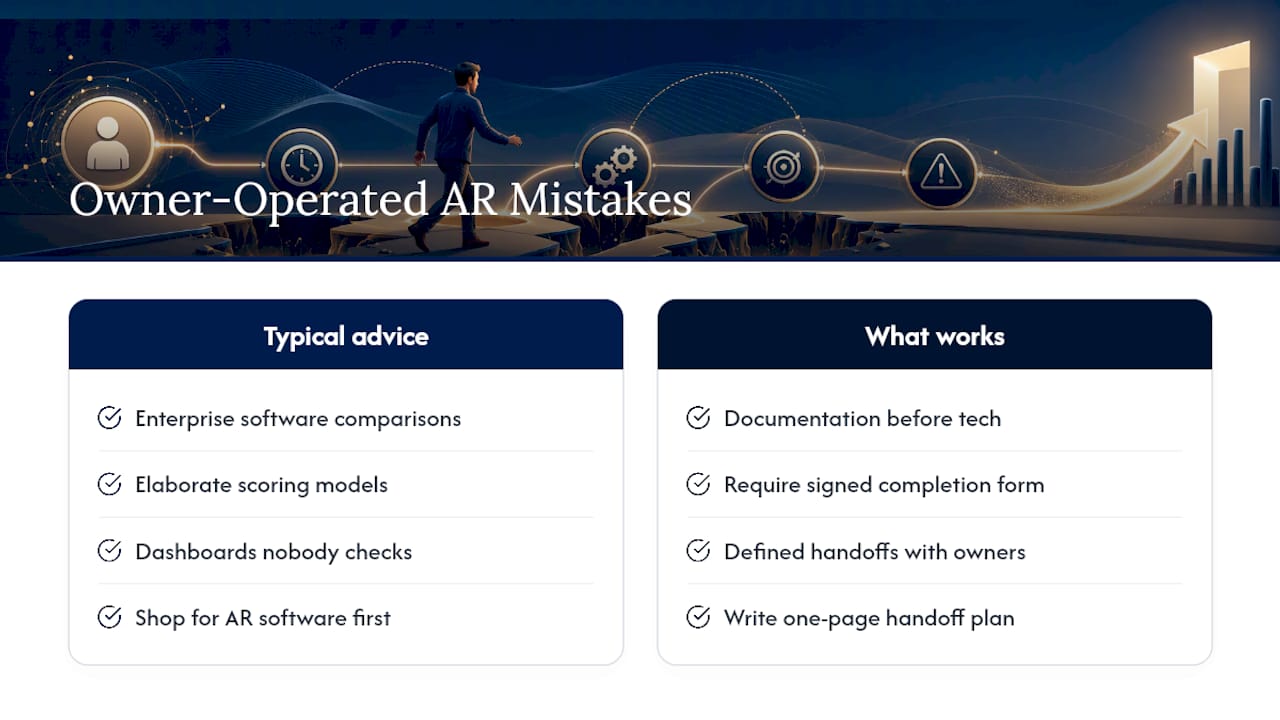
The research behind this piece keeps pointing back to the same place: the businesses with the cleanest DSO numbers aren’t the ones with the fanciest tools, they’re the ones that refuse to let an invoice out the door without a signed completion form attached. That’s a discipline problem before it’s a technology problem.
If I had to tell an HVAC or electrical contractor where to spend their first month of effort, it wouldn’t be shopping for AR software. It would be writing down, in one page, who owns each handoff and what document has to exist before the next step happens. Automation makes a good process faster. It does nothing for a process that was never defined in the first place.
— Tony
Let TrueMeasure Accounting Run Your Accounts Receivable Workflow
You don’t have to choose between chasing invoices yourself and hiring a full-time AR clerk. TrueMeasure Accounting gives owner-operated service businesses a middle path: outsourced invoicing execution, cash application support, and fractional CFO oversight that maps directly to the workflow stages covered above, without adding a full-time salary to your payroll.
Our clients in HVAC, plumbing, electrical, construction, and trucking typically come to us after months of chasing overdue invoices in spare time between jobs. We take over the invoice-readiness gate, run the pre-due and collections cadence, and reconcile the AR subledger to the general ledger every month so your aging report actually reflects reality. From there, a fractional CFO can use that clean data to guide pricing, hiring, and equipment decisions instead of guessing. If your billing contact list, PO rules, and reminder cadence still live in someone’s head instead of a documented process, that’s the exact gap our outsourced invoicing support services are built to close.
Reach out through our contact page to schedule a diagnostic call and see where your current AR workflow is leaking cash.
Sources
- Segregation of duties: Preventive and detective controls | UCLA Finance
- Accounts receivable workflow for finance teams | Workhint blog
- How to Reduce DSO: 7 Strategies for AR Teams | Billtrust
- Accounts receivable management | J.P. Morgan insights