
A chart of accounts (COA) is your business’s organized index of every ledger account used to record transactions and produce financial statements. Think of it as the filing system behind every number on your profit and loss statement, balance sheet, and cash flow report. At Truemeasureaccounting, we treat the COA as the single most important structural decision a service business owner makes, because a poorly designed one hides profit leaks and makes job costing nearly impossible.
Every COA contains five core elements for each account:
- Account number — a numeric or alphanumeric identifier that controls sort order and rollup logic
- Account name — a clear, descriptive label (e.g., “HVAC Installation Revenue,” not just “Revenue”)
- Category — the account type: asset, liability, equity, revenue, or expense
- Financial statement placement — balance sheet (assets, liabilities, equity) or income statement (revenue, expenses)
- Description — a brief note on what transactions belong in that account
The COA is the foundational architecture from which your balance sheet, income statement, and cash flow statement are assembled. Get it right, and every report you run tells you something useful. Get it wrong, and you’re flying blind on pricing, margins, and cash.
Table of Contents
- What is a chart of accounts, and how is it structured?
- A sample COA you can adapt for your service business
- Why your COA directly affects profitability, cash flow, and taxes
- How to design a COA that actually supports your decisions
- Common COA mistakes and how to avoid them
- Is a chart of accounts legally required in the US?
- Key Takeaways
- The COA insight most service owners miss
- Truemeasureaccounting can set up or rework your COA
- Useful sources and further reading
What is a chart of accounts, and how is it structured?
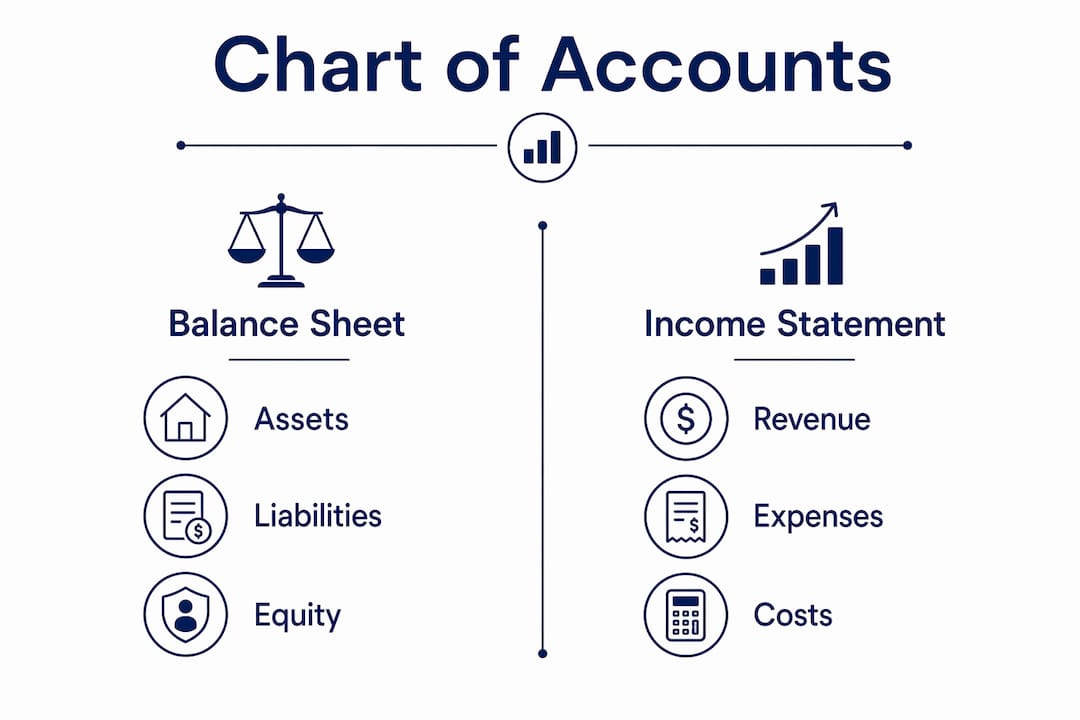
A COA is divided into two high-level groups: balance-sheet accounts and income-statement accounts. Standard COA structure lists balance-sheet accounts first, followed by income-statement accounts, in the order they appear on financial statements.

Balance-sheet accounts
These track what your business owns, owes, and what’s left over for the owner:
- Assets — cash, accounts receivable, equipment, vehicles
- Liabilities — accounts payable, credit lines, loans, sales tax payable
- Equity — owner’s equity, retained earnings, owner draws
Income-statement accounts
These capture what you earn and spend during a period:
- Revenue — service income, material sales, maintenance contracts
- Expenses — labor, materials, fuel, insurance, rent, payroll taxes
Account numbering conventions
Consistent numbering is what makes rollups and reporting work. Most small service businesses use a four-digit scheme:
| Category | Typical Range | Example Accounts |
|---|---|---|
| Assets | 1000–1099 | 1010 Checking Account |
| Liabilities | 2000–2099 | — Accounts Payable |
| Equity | 3000–3099 | — Owner’s Equity |
| Revenue | 4000–4030 | 4010 Service Revenue |
| Expenses | 5000–5030 (direct costs), 6000 series (overhead) | 5010 Direct Labor, 5020 Materials |

Leaving gaps between numbers (1010, 1020, 1030 rather than 1001, 1002, 1003) gives you room to insert new accounts without renumbering everything. A few naming rules that matter in practice: always use specific, descriptive names; never create two accounts that serve the same purpose under slightly different labels; and avoid names like “Miscellaneous Expense,” which become catch-all buckets that obscure where money actually goes.
A sample COA you can adapt for your service business
The table below is a working COA built for a job-based service firm, such as an HVAC company, plumbing contractor, or electrical contractor. It’s compact by design. The goal is to capture what you need for job costing and profitability analysis without creating so many accounts that reports become unreadable.
| Account # | Account Name | Description |
|---|---|---|
| 1010 | Checking Account | Primary operating bank account |
| 1020 | Savings / Reserve Account | Cash reserve or tax savings account |
| — | Accounts Receivable | Amounts owed by customers for completed jobs |
| — | Equipment & Tools | Owned equipment, tools, and machinery |
| — | Accumulated Depreciation | Contra-asset for equipment depreciation |
| — | Accounts Payable | Amounts owed to vendors and suppliers |
| — | Line of Credit | Outstanding balance on business credit line |
| — | Payroll Liabilities | Payroll taxes withheld but not yet remitted |
| — | Owner’s Equity | Owner’s capital contributions |
| — | Retained Earnings | Cumulative net income kept in the business |
| 4010 | Service Revenue | Revenue from labor and installation jobs |
| — | Maintenance Contract Revenue | Recurring revenue from service agreements |
| 4030 | Material Sales | Revenue from parts and materials billed to customers |
| 5010 | Direct Labor | Wages for field technicians and installers |
| 5020 | Materials & Parts | Cost of parts and materials used on jobs |
| 5030 | Subcontractor Costs | Payments to subcontractors for job work |
| — | Vehicle Fuel & Maintenance | Fuel, oil changes, and vehicle repairs |
| — | Payroll Taxes | Employer-side payroll tax expense |
| — | Insurance | General liability, workers’ comp, vehicle insurance |
| — | Rent & Utilities | Office, shop, or warehouse costs |
| — | Advertising & Marketing | Digital ads, direct mail, lead generation |
| 6050 | Software & Subscriptions | Accounting, dispatch, and field service software |
| 6060 | Office & Administrative | Supplies, postage, and miscellaneous office costs |
How this maps to job costing: Accounts 5010, 5020, and 5030 are your direct job costs. When you assign transactions to a job or class in QuickBooks or similar software, these three accounts feed your job-level P&L. Revenue accounts 4010–4030 tell you which service lines are growing. The overhead accounts (6000 series) stay separate so you can calculate true gross margin per job without overhead distortion.
Pro Tip: Don’t create separate expense accounts for every job or customer. Instead, use one set of direct-cost accounts and assign a job code or class to each transaction. This keeps your COA compact and your reports readable.
Why your COA directly affects profitability, cash flow, and taxes
A clean COA is not a compliance exercise. It’s the foundation of every business decision you make with financial data. A well-constructed COA enables faster period close, easier financial analysis, and supports both statutory and management reporting. For a service business owner, that translates into three concrete advantages.
Profitability by job or service line. When your COA separates direct labor, materials, and subcontractor costs from overhead, you can run a gross margin report by job, customer, or service line. That’s how you find out which jobs are actually making money and which ones are quietly draining it. Many HVAC and plumbing owners are surprised to discover that their highest-revenue customers are often their least profitable ones once labor and materials are properly allocated. Understanding bookkeeping’s role in profitability starts with getting this structure right.
Cash flow forecasting. A COA that separates recurring revenue (maintenance contracts) from one-time project revenue gives you the data to build a reliable cash flow forecast. Without that separation, you can’t tell whether next month’s cash position is predictable or dependent on landing new jobs.
Tax preparation and audit readiness. The IRS expects records that support every line on your tax return. A COA aligned to your tax categories (vehicle expenses, depreciation, payroll taxes, insurance) makes tax prep faster and reduces the risk of missed deductions. It also means your CPA or tax advisor spends less time reconstructing your books and more time on strategy.
How to design a COA that actually supports your decisions
Designing a COA around how the business is actually managed is the single most important principle here. Start with the reports you need, not with a default template from your software.
- List your required financial outputs first. Write down the reports you actually need: P&L by job, P&L by service line, monthly cash flow, gross margin by technician. These outputs determine which accounts you need.
- Define your five high-level categories. Assets, liabilities, equity, revenue, expenses. Every account belongs to one of these.
- Choose a numbering scheme and stick to it. Four-digit numbering with gaps (1010, 1020) works for most service SMBs. Assign ranges by category as shown in the structure section above.
- Limit your account count. Aim for 40–60 accounts for a service business with under $5 million in revenue. More accounts rarely produce better reports.
- Use job codes or classes for operational tracking. Rather than creating “HVAC Labor” and “Plumbing Labor” as separate accounts, use one “Direct Labor” account and assign a job class to each transaction. This is how service firms track job-level margins without bloating the ledger.
- Test your reports before going live. Enter a few sample transactions and run your P&L and balance sheet. If the output doesn’t match what you need, adjust the structure before you have months of data to remap.
- Assign COA ownership. One person, whether that’s your bookkeeper, controller, or fractional CFO, should own the COA and approve any changes. Document every change with a brief note explaining why it was made.
Migrating from an old COA: Map each old account to its new equivalent before switching. Never delete old accounts mid-year; instead, make them inactive so historical data stays intact. Structural changes mid-year require remapping historical transactions to keep year-over-year comparisons valid.
Pro Tip: If you’re using QuickBooks Online or QuickBooks Desktop, use the “Class” or “Project” feature for job tracking rather than creating separate expense accounts per job. It keeps your COA clean and your reports filterable by any dimension you need.
Common COA mistakes and how to avoid them
Most COA problems fall into a handful of repeating patterns. Knowing them in advance saves you months of cleanup work.
Account bloat is the most common issue. Owners or bookkeepers add new accounts every time a new expense appears, rather than using existing categories. Within a year, a 40-account COA becomes 120 accounts, reports become unreadable, and no one can find anything. Practitioners recommend periodic pruning and using software features like classes and tags to preserve analysis capability without multiplying accounts.
Inconsistent naming creates confusion and duplicate entries. “Fuel,” “Gas Expense,” and “Vehicle Fuel” might all exist in the same COA, each capturing slightly different transactions. Pick one name per concept and document it.
Changing structure without remapping history breaks year-over-year comparisons. If you rename or reclassify an account in October, your prior nine months of data sits in the old account. Your annual P&L becomes meaningless for trend analysis. COA changes require remapping historical data to keep reporting reliable.
Operational tracking in account names is a trap. Creating “Labor Job 1042” or “Materials Smith Residence” as ledger accounts is a sign that job tracking hasn’t been set up properly. Those details belong in job codes or classes, not in the COA itself.
Maintenance routine that keeps your COA useful
- Quarterly review: Check for accounts with zero activity. Deactivate any that haven’t been used in six months.
- Annual alignment: Before year-end, confirm your COA categories match your tax return line items. Mismatches slow down tax prep.
- Change log: Keep a simple document that records every account added, renamed, or deactivated, with the date and reason. This is your audit trail and your onboarding guide for any new bookkeeper.
Is a chart of accounts legally required in the US?
A COA is not a standalone legal document you file with any agency. However, U.S. GAAP guidelines require financial records organized well enough to produce compliant financial statements, and the IRS expects records that support every line of your tax return. In practice, that makes a COA effectively mandatory for any business that needs auditable financials or accurate tax filings.
For most small service businesses under $5 million in revenue, the practical threshold is straightforward: you need enough account structure to produce a balance sheet, income statement, and cash flow statement that reflect reality. Larger entities or consolidated companies need more segmentation, as illustrated by how university controllers use multi-segment COAs for fund, organization, and activity tracking. For an HVAC company or plumbing contractor, a well-maintained 40–60 account COA is sufficient.
One caution: avoid making structural changes mid-year unless you’re prepared to remap historical transactions. A mid-year restructure without remapping produces a P&L that’s inconsistent across the year, which creates problems at tax time and makes trend analysis unreliable.
Key Takeaways
A chart of accounts is the structural foundation of every financial report your business produces, and designing it around your actual management decisions, not a default software template, is what separates useful reporting from noise.
| Point | Details |
|---|---|
| COA definition | A COA is an organized index of every ledger account used to record transactions and produce financial statements. |
| Structure matters | Organize accounts in five categories (assets, liabilities, equity, revenue, expenses) with consistent four-digit numbering and descriptive names. |
| Job costing requires the right design | Separate direct costs (labor, materials, subcontractors) from overhead, then use job codes or classes for job-level margin tracking. |
| Avoid account bloat | Keep your COA to 40–60 accounts for most service SMBs; use software dimensions for operational tracking, not additional ledger accounts. |
| Truemeasureaccounting | Truemeasureaccounting helps service businesses design, clean up, and maintain a COA that connects financial data to real profitability and cash flow decisions. |
The COA insight most service owners miss
Here’s what I see repeatedly with owner-operated service businesses: the COA gets set up once, usually by copying a software default, and then nobody touches it for years. Transactions pile up in vague accounts. “Miscellaneous Expense” becomes a graveyard for anything the bookkeeper wasn’t sure about. By the time the owner wants to know which service line is most profitable or why cash is tight despite strong revenue, the data is too muddled to answer the question.
The COA isn’t a bookkeeping formality. It’s a finance data model, and when it’s aligned to operations, it becomes the connection between daily transactions and the decisions that actually move the business forward. An HVAC company that separates maintenance contract revenue from installation revenue, and tracks direct labor and materials by job, can tell within minutes whether a technician is profitable, whether a service agreement is priced correctly, and whether the business can afford to add a truck next quarter.
The businesses that get the most value from their financials are not the ones with the most sophisticated software. They’re the ones with a clean, intentional COA that was designed to answer specific questions. Treating accounting as a strategic tool rather than a compliance obligation is what separates businesses that grow with clarity from those that grow with anxiety.
Truemeasureaccounting can set up or rework your COA
If your current books can’t tell you which jobs are profitable, which customers cost you money, or why cash is tight at the end of a strong month, the problem usually starts with the COA.
Truemeasureaccounting works with HVAC companies, plumbing contractors, electricians, general contractors, trucking businesses, and real estate investors across the United States to design COAs that produce reports owners can actually use. Services include QuickBooks cleanup and COA restructuring, job-cost setup, monthly bookkeeping, financial reporting, and fractional CFO advisory. Whether you need a one-time cleanup or ongoing financial management, the process starts with getting your account structure right.
See how it works on the bookkeeping services page, or review industry-specific solutions for your business type. Ready to get started? Visit Truemeasureaccounting to learn how engagements work and take the first step toward financial clarity.
Useful sources and further reading
- Investopedia: Chart of Accounts (COA) — Definition, How It Works, and Example — Accessible overview of COA structure, purpose, and customization principles.
- NetSuite: Chart of Accounts — Definition, Best Practices, and Examples — Covers best practices, account bloat, and change-control guidance for growing businesses.
- Deloitte: Strategic Chart of Accounts Design — Practitioner-level guidance on aligning COA design to management reporting and operational decision-making.
- Corporate Finance Institute: Chart of Accounts — Definition, How to Set Up, Categories — Detailed breakdown of account categories and setup steps with examples.
- Cornell Law School / Legal Information Institute: Chart of Accounts — Legal reference on COA definition and GAAP compliance context.
- Harvard University Office of the Controller: Chart of Accounts — Illustrates how multi-segment COAs work for complex organizations, useful contrast for SMB design decisions.