

QuickBooks supports progress invoicing: turn the feature on, create an estimate, then convert that estimate into multiple staged invoices tied to milestones. It’s available in both QuickBooks Online and Desktop, and it starts with an approved estimate, not a blank invoice. Used with milestone-based estimates, it closes the gap between work performed and cash collected, and it gives you cleaner job costing along the way.
TL;DR:
- Progress invoicing requires an approved estimate, admin access, and a suitable invoice template, or the feature may not function correctly.
- Setting up estimate summaries in invoice styles is critical for clear billing and reducing client questions about remaining balances.
- Choosing a billing method aligned with client expectations, such as percentage or fixed amounts, helps maintain transparency and trust.
- Properly tracking progress invoices through reports and linked transactions prevents double billing and ensures job costing accuracy.
- Handling scope changes with new estimates and formal change orders preserves audit trails and avoids over-billing or confusion.
Table of Contents
- Progress Invoicing QuickBooks Setup: Prerequisites and Toggles
- How Do You Convert an Estimate Into a Progress Invoice?
- Choosing Billing Methods and Customizing Invoice Templates
- How Do You Track Progress Invoices in QuickBooks?
- What Are the Biggest Progress Invoicing Mistakes Contractors Make?
- Handling Change Orders and Closing Out Estimates
- How Do You Handle Partial Payments and Retainers in Progress Invoicing?
- What Legal and Accounting Rules Apply to Progress Invoicing?
- How Does Progress Invoicing Affect Cash Flow and Financial Reporting?
- Why Staged Billing Should Be a Discipline, Not a Checkbox
- How TrueMeasure Accounting Helps You Build a Real Progress Invoicing System
- Sources
Progress Invoicing QuickBooks Setup: Prerequisites and Toggles
Before you bill your first milestone, three things need to be in place: admin access to your QuickBooks company file, an estimate already created for the customer or project, and a decision about which invoice template you’ll use to present staged billing. Skip any one of these and the feature won’t behave the way you expect.
Here’s how to turn it on in each version:
- QuickBooks Online: Go to Settings, then Account and settings, then the Sales tab. Find Progress Invoicing and toggle it on. Save your changes.
- QuickBooks Desktop: Go to Edit, then Preferences, then Jobs & Estimates. Enable progress invoicing from the Company Preferences tab, which requires admin rights in a single-user mode session.
- Either version: Once the toggle is on, revisit your Custom form styles and turn on estimate summaries so invoices display running totals automatically.
That last step matters more than most owners realize. Without it, your invoice shows the current bill but nothing about what’s already been paid or what’s left, which is exactly the ambiguity that triggers “wait, how much do we owe you again?” phone calls. QuickBooks Online lets you build multiple partial invoices from one estimate once this setup is complete, and Desktop users enable the same functionality through Preferences → Jobs & Estimates.
How Do You Convert an Estimate Into a Progress Invoice?
Once an estimate is accepted, QuickBooks Online gives you two paths to bill against it. The direct route: open the estimate and click Convert to invoice, then choose your billing method. The indirect route: start a new invoice for that customer, and QuickBooks will surface the open estimate under Suggested transactions so you can pull it in without hunting for it.
At that point, you pick how much of the estimate to bill:
- Remaining total bills whatever hasn’t been invoiced yet, useful for a final payment once the job wraps.
- Percentage bills a flat share, like 30% at kickoff, 40% at rough-in, 30% at completion.
- Fixed amount lets you bill a specific dollar figure regardless of the percentage it represents.
- Manual per line gives you line-by-line control, ideal when some scope items are done and others haven’t started.
Pro Tip: Set your first progress invoice as a percentage tied to mobilization costs, not an arbitrary “deposit.” Framing it around actual startup expenses, permits, materials ordered, crew scheduled, makes it far easier to defend if a customer questions why they’re paying before work is visible.
Choosing Billing Methods and Customizing Invoice Templates
The billing method you choose should match how the client thinks about paying, not just how the math works. Percentage billing suits jobs with predictable phases, like a bathroom remodel with clear rough-in and finish stages. Fixed-amount billing works better for contracts with negotiated milestone payments already spelled out.
Whatever method you pick, the invoice needs to communicate it clearly:
- Turn on estimate summaries in Custom form styles so every progress invoice shows the total estimate, amount already invoiced, and remaining balance.
- Label milestones in plain language (“Rough-In Complete,” not “Phase 2”) so clients don’t have to guess what they’re paying for.
- Put the remaining balance near the top of the invoice, not buried at the bottom, since that’s the number most clients actually scan for.
Adding an estimate summary to a progress invoice gives customers visibility into total estimate, amount invoiced, and remaining balance, which meaningfully cuts down on payment disputes. A client who can see the math trusts the bill more than one who has to take your word for it.
How Do You Track Progress Invoices in QuickBooks?
Every progress invoice carries a linked transactions section, usually visible near the bottom of the invoice screen, that shows the originating estimate and any related invoices. Click through it to confirm you’re billing against the right project and haven’t accidentally double-counted a milestone.
For a wider view, two reports do the heavy lifting:
- Estimates & Progress Invoicing Summary by Customer lists every open estimate alongside what’s been invoiced against it, which is the fastest way to spot a project that’s stalled at 60% billed with no invoice in three months.
- Job Progress Invoices vs. Estimates compares invoiced totals to the original estimate line by line, flagging jobs approaching or exceeding their contracted amount.
QuickBooks tracks this through the Estimates & Progress Invoicing Summary by Customer report, which should be part of your month-end routine, not something you check only when a client complains. Once an estimate is fully billed, QuickBooks marks its status as closed automatically. Your month-end checklist should confirm three things: every closed estimate has matching invoiced totals, no job shows negative remaining balance, and revenue recognized in your books lines up with actual completion percentage, not just what’s been billed. This last point matters for job costing covered in more detail in a job costing setup guide for contractors.
What Are the Biggest Progress Invoicing Mistakes Contractors Make?
The single biggest mistake is treating the estimate as a sales document instead of a budget baseline. Break estimates into stages that mirror how the job actually gets built, demo, rough-in, finish, punch list, and progress invoicing becomes mechanical instead of a monthly argument with yourself about what to bill.
Operational control is the second piece owners skip. Someone on your team needs to be the person who confirms percent complete before an invoice goes out, and that confirmation needs to leave a paper trail. Assigning a named project manager to verify percent-complete at each billing cutoff, backed by a simple log, whether that’s a shared spreadsheet or a note in your project management tool, is what separates a defensible billing practice from a guess dressed up as an invoice.
Pro Tip: Never edit a closed estimate to reflect scope changes. If a client adds a bathroom to the remodel, write a new estimate or a formal change order and bill against that separately. Editing a closed estimate quietly erases your audit trail and makes it nearly impossible to explain a billing discrepancy months later.
Structuring estimates around clear billing stages also reduces the risk of accidentally over-billing a line item. Pair that with a documented percentage-of-completion approach and you’ve built a system, not just a habit. Contractors who want language for framing project scope with clients often find guidance in resources on structuring project phases genuinely useful when drafting the estimate itself.
Handling Change Orders and Closing Out Estimates
Scope changes happen on almost every project, and how you handle them in QuickBooks determines whether your books stay clean or turn into a mess by project close.
- New scope, new estimate. If a client adds work outside the original contract, create a new estimate or formal change order rather than editing the existing one. This preserves your original baseline for comparison.
- Unlinking a progress invoice from its estimate is sometimes necessary, say, if an invoice was created against the wrong project. QuickBooks allows this from the invoice’s linked transactions view, but only do it when the link is genuinely wrong, not as a shortcut to avoid creating a new estimate.
- Watch for the 100% ceiling. QuickBooks will restrict or warn you when a progress invoice would push billed totals past the estimate’s full amount. That’s your signal to create a change order instead of forcing the number through.
- Keep records tight. Save every change order alongside its originating estimate so your job-costing reports reflect actual contracted scope, not a blended mess of original and amended numbers.
How Do You Handle Partial Payments and Retainers in Progress Invoicing?
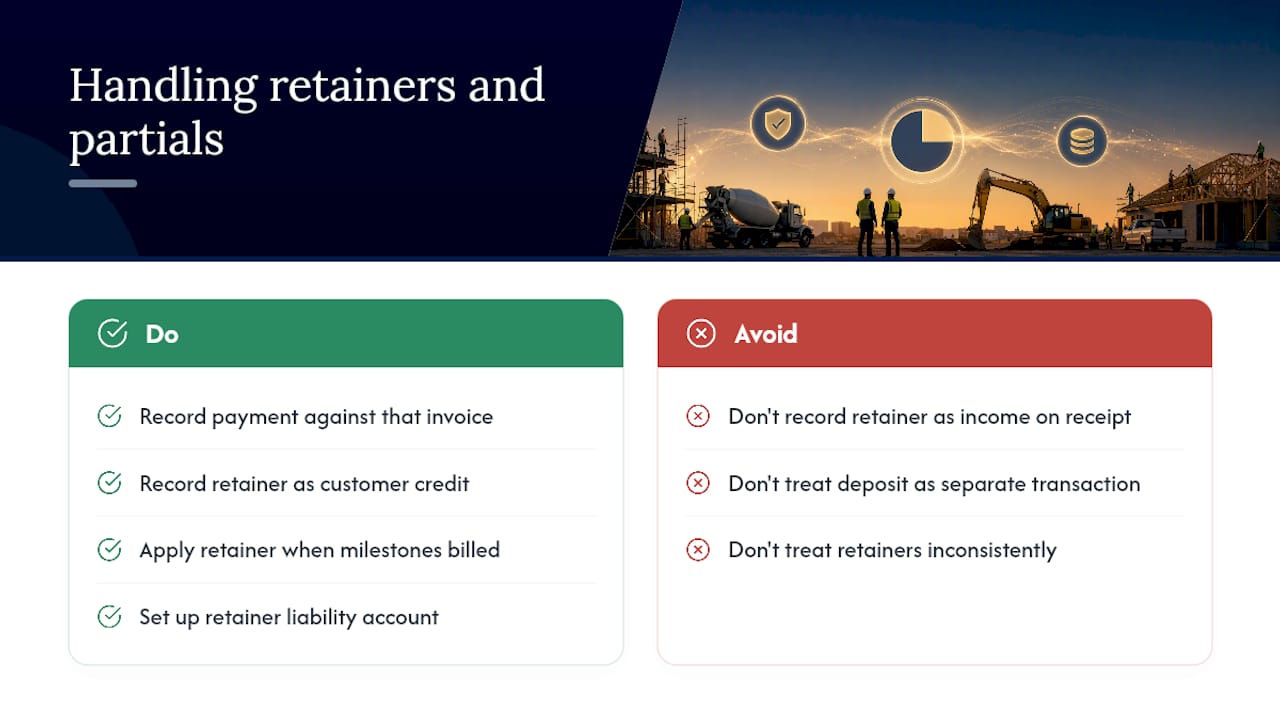
Partial payments on a progress invoice work the same way they do on any QuickBooks invoice: you record the payment received against that specific invoice, and QuickBooks tracks the remaining balance automatically. The complication comes with retainers, upfront deposits collected before work begins, since these need to be handled as a liability, not revenue, until they’re actually earned.
The cleanest approach is to record a retainer as a credit on the customer’s account or through a dedicated liability account, then apply it against progress invoices as milestones are billed. Don’t just deposit a retainer check and call it income on day one. Doing so overstates revenue in the month you collect the retainer and understates it later when the work actually happens, which throws off your job costing and can mislead you about how profitable a project really is.
For contractors requiring a deposit before mobilization, that deposit should show up on the first progress invoice as an applied credit, not a separate, disconnected transaction. This keeps the estimate-to-invoice trail intact and gives clients a single, coherent record of what they’ve paid versus what they owe. If your business collects retainers regularly, particularly common in construction and larger remodel work, it’s worth setting up a standard retainer liability account once rather than improvising the entry every time a new deposit comes in. Bookkeepers managing several active projects benefit from documenting this process once and applying it consistently, since inconsistent retainer treatment is one of the more common sources of tax season surprises when retained cash gets miscounted as profit.
What Legal and Accounting Rules Apply to Progress Invoicing?
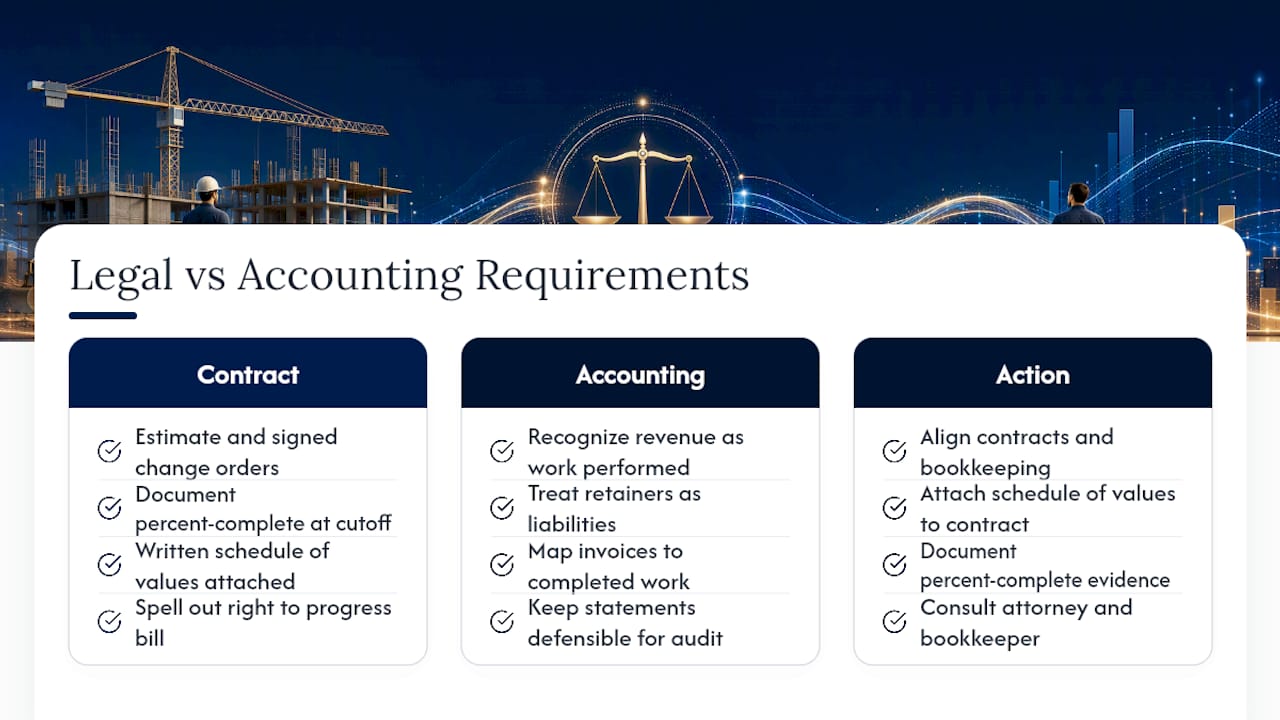
Progress invoicing sits at the intersection of contract law and revenue recognition, and both matter more than most owners realize until a dispute forces the issue. On the contract side, your estimate and any signed change orders function as the legal basis for what you’re allowed to bill. If a client disputes a progress invoice, the first thing that gets pulled up is the original estimate and whatever documentation shows percent complete at the billing cutoff. Vague estimates or undocumented completion percentages leave you with a weak position, regardless of how much actual work got done.
On the accounting side, revenue recognition standards generally require you to recognize revenue as work is performed, not simply when cash is collected. This is why treating retainers as liabilities and mapping invoices to actual completed work matters beyond just good bookkeeping hygiene, it keeps your financial statements defensible if you’re ever audited, applying for financing, or preparing to sell the business. Lenders and buyers look closely at whether billed revenue matches actual project completion, and a pattern of front-loaded billing without matching work can raise real questions during due diligence.
Contract language should also spell out your right to progress bill, the milestones that trigger each invoice, and what happens if a client disputes a percentage. Verbal agreements about “billing as we go” don’t hold up nearly as well as a written schedule of values attached to the signed contract. If you’re unsure whether your current contracts and estimates give you solid legal footing for progress billing, that’s worth a conversation with both your attorney and whoever manages your books, since the two documents need to tell the same story.
How Does Progress Invoicing Affect Cash Flow and Financial Reporting?
Progress invoicing exists to solve one specific problem: the lag between spending money on labor and materials and getting paid for finished work. A contractor billing only at project completion is effectively financing the entire job out of pocket, sometimes for months, which is a major reason otherwise profitable contracting businesses run into cash flow shortfalls despite healthy margins on paper.
Progress invoicing aligns billing with milestones and narrows that working capital gap, but only when paired with estimates disciplined enough to reflect real project phases and documented completion checks. Bill too aggressively ahead of actual progress and you risk running short on cash near project completion, when finish-out costs tend to spike. Bill too conservatively and you’re floating the client’s project on your own credit.
On the reporting side, progress invoicing changes how revenue shows up on your books month to month. Instead of one large revenue spike at project close, you get smaller, staggered recognition tied to actual milestones, which produces a far more accurate picture of monthly performance. This matters enormously for job costing: if you’re comparing costs incurred against revenue recognized on a project-by-project basis, staged billing keeps those two numbers in the same time frame instead of costs hitting your books in March while revenue doesn’t land until June. For owners building out a cash flow forecast, progress invoicing data becomes one of the more reliable inputs you have, since it’s tied directly to contracted, documented milestones rather than sales projections.
Why Staged Billing Should Be a Discipline, Not a Checkbox
Switch to milestone billing at framing, rough-in, and finish, and that same contractor collects cash roughly in step with labor and material costs going out the door. That shift alone often does more for a contracting business’s financial health than any pricing change.
Truemeasureaccounting works with contractors and service businesses to build estimates that actually map to billing stages, configure QuickBooks templates that make invoices clear to clients, and set up the job-costing controls that keep progress invoicing honest month over month. If your current setup feels more like guesswork than a system, that’s worth a conversation.
— Tony
How TrueMeasure Accounting Helps You Build a Real Progress Invoicing System
Truemeasureaccounting is the direct alternative to muddling through QuickBooks setup alone or paying a generalist bookkeeper who treats progress invoicing as an afterthought. We build the actual system: QuickBooks setup and cleanup, custom invoice templates with estimate summaries turned on, job-costing structures that map estimates to billing stages, and recurring invoicing workflows that don’t rely on you remembering which milestone comes next.
This work fits naturally with contractors, HVAC and plumbing companies, electrical contractors, general contractors, trucking and transportation businesses, and property managers, the exact owner-operated service businesses where staged billing has the biggest impact on cash flow. If your QuickBooks file needs a real setup rather than another toggle switch, our bookkeeping services start with exactly this kind of operational cleanup. Schedule a consultation and we’ll walk through your current estimates, invoicing templates, and job-costing setup together, then map out what needs to change before your next project kicks off.