
Cloud bookkeeping moves your books to cloud-based software and makes your cash position, job costing, and reconciliations available in real time. The single best next step for an owner-operated service business is simple:
- Connect your bank feeds to a cloud platform this week, or
- Contact Truemeasureaccounting for a migration assessment
Key Takeaways
Cloud bookkeeping works because real-time bank feeds, automation, and job-level reporting turn financial data into decisions instead of historical records.
| Point | Details |
|---|---|
| Definition matters | Cloud bookkeeping runs on hosted software with automatic bank feeds, multi-user access, and real-time reporting. |
| Job costing is the payoff | Tagging labor and materials by job reveals which contracts or customers are actually profitable. |
| Migration takes weeks, not months | A full switch typically runs two to six weeks with a verification cadence to catch errors early. |
| Watch for hidden risks | Vendor lock-in, weak permissions, and add-on fees are the most common pitfalls; regular exports mitigate them. |
| Truemeasureaccounting bridges data to decisions | Fixed-fee bookkeeping and cleanup services turn cloud data into profitability and cash flow insight for owner-operated firms. |
Table of Contents
- What Is Cloud Bookkeeping, Exactly?
- What Are the Real Benefits for a Small Business?
- What Features Should You Insist On?
- Cloud vs. Traditional Bookkeeping: What Actually Changes?
- How Do You Choose the Right Cloud Bookkeeping Solution?
- What Does a Migration to Cloud Bookkeeping Look Like?
- What Are the Risks, and How Do You Avoid Them?
- How Does Cloud Bookkeeping Connect to Profitability and Cash Flow?
- Ready to Move Your Books to the Cloud?
- Sources
What Is Cloud Bookkeeping, Exactly?
Cloud bookkeeping is bookkeeping software hosted online instead of installed on one office computer. Your bank feeds connect automatically, transactions get categorized with rules or AI, and anyone with permission can log in from a job site, a truck cab, or a kitchen table.
Desktop bookkeeping ties your data to one machine. If that computer crashes, or if your bookkeeper is out sick during the week you need a cash report, you are stuck. Cloud platforms back up automatically and push software updates without you lifting a finger, a distinction GoCardless frames as the core difference between the two models.
- QuickBooks Online and Xero are the two platforms most owners will hear about first, and both illustrate the category well.
- Neither is an endorsement here, just the reality of what shows up in most vendor comparisons.
What Are the Real Benefits for a Small Business?
The benefits that actually move your numbers go beyond convenience. Here’s what changes when your books live in the cloud:
- Faster invoicing and collections because invoices go out the moment a job closes, not when someone gets back to the office.
- Real-time cash position instead of a number that’s three weeks stale.
- Accurate job costing so you know which jobs made money and which quietly bled it.
- Fewer month-end surprises, since categorization happens continuously instead of in a January scramble.
- Scalability as you add crews, trucks, or locations without re-platforming.
HelloBooks.ai claims its automated reconciliation and categorization can save small businesses significant bookkeeping hours each month, and Zera Books makes a similar case for AI-driven document processing speeding up reconciliation. Either way, the time saved isn’t the point. What you do with it is.
Pro Tip: Don’t let the hours you save disappear into busywork. Redirect them into reviewing job-level profitability every month, or park the savings straight into a cash reserve. Time saved that isn’t redeployed is just time wasted differently.
What Features Should You Insist On?
Not every cloud platform is built the same way, and the gaps show up fast once you’re relying on the numbers to price jobs. Before you commit, confirm the software handles:
- Automatic bank feed connections, not manual CSV uploads
- Rules-based transaction categorization you can customize
- Invoice and payment tracking with aging visibility
- Integrations for payroll, payment processing, and job-costing tools
- Multi-user access with role-based permissions
- An audit trail showing who changed what and when
- Reporting depth: P&L, balance sheet, cash flow, and job-level or project-level detail
Job-level reporting matters most for owners in HVAC, trucking, and construction, where one underpriced job can quietly erase the margin from three good ones. Xero documents bank feed automation and real-time P&L, balance sheet, and cash flow reporting as standard features, and QuickBooks Online covers similar ground. Treat both as reference points for what “table stakes” looks like, not as your final decision.
Cloud vs. Traditional Bookkeeping: What Actually Changes?
The trade-offs come down to a handful of practical differences:
- Access: cloud works from anywhere with internet; desktop ties you to one machine.
- Backup and disaster recovery: cloud platforms back up automatically; desktop backup is on you.
- Collaborating with an accountant: cloud allows shared, real-time access; desktop usually means emailing files back and forth.
- Cost model: cloud is a monthly subscription; desktop is often a one-time purchase with periodic paid upgrades.
- Scaling: cloud adds users and locations with a few clicks; desktop often requires new licenses or hardware.
Desktop still makes sense for a handful of businesses with no internet dependency and zero need for remote collaboration, but for most owner-operated firms managing crews, jobs, or routes, cloud is the clear call.
Pro Tip: Export your data monthly regardless of platform. It keeps you free to switch providers without losing your history, and it protects you if a vendor changes pricing or shuts down a feature you rely on.
How Do You Choose the Right Cloud Bookkeeping Solution?
Selection comes down to a short list of criteria that actually predict whether the platform will hold up under real use:
- Bank matching accuracy. Does it correctly reconcile transactions without constant manual correction?
- Automation depth. How much categorization happens without you touching it?
- Job-costing and reporting detail. Can it break out profitability by job, customer, or service line?
- Integrations. Does it connect cleanly to payroll and payment processors you already use?
- User permissions. Can you limit what office staff versus field supervisors can see and edit?
- Migration support and data export. Can you get your data out easily if you ever leave?
Pricing generally falls into two shapes: software subscriptions that run from roughly free to a few hundred dollars a month depending on tier, and managed bookkeeping services billed as a fixed monthly fee or a fixed-fee project. Fixed-fee bookkeeping tends to give owners more budget certainty than hourly billing, which can swing wildly during a messy month.
A realistic timeline for switching software or providers runs two to six weeks depending on how clean your existing books are. During a discovery call, ask directly: What’s included in the monthly fee? How do you handle job costing? What happens if I need historical data pulled later? Reviewing outsourced accounting service models before that call helps you spot vague answers fast.
What Does a Migration to Cloud Bookkeeping Look Like?
Moving your books doesn’t need to be dramatic if you follow a sequence:
- Back up and export your existing desktop data (allow half a day).
- Connect bank and credit card feeds to the new platform (usually same day, pending bank approval).
- Set up your chart of accounts and job or project tags so reporting lines up with how you actually run the business (one to two days).
- Import opening balances from your last reconciled statement (half a day, more if records are messy).
- Run a full reconciliation and verification month before declaring the old system dead (two to four weeks).
- Train your team, ideally designating one power-user who becomes the internal go-to.
Before going live, confirm the prior month is fully reconciled, every open invoice balance matches reality, and vendor account balances tie out. Practical migration success depends less on which software brand you pick and more on disciplined data prep and a 30/60/90-day verification cadence, which catches errors before they compound.
What Are the Risks, and How Do You Avoid Them?
The most common pitfalls are vendor lock-in, sloppy category rules that quietly corrupt your reports, weak user permissions, and hidden add-on fees that inflate the “starting at” price you saw in a sales call.
Mitigate each directly: enforce role-based access from day one, export backups on a regular schedule, test your reports against manual math right after migration, and get any provider’s scope in writing before you sign.
Pro Tip: Train one power-user early and schedule monthly review calls for the first 90 days. Change management, not software features, is usually what determines whether a migration actually sticks.
How Does Cloud Bookkeeping Connect to Profitability and Cash Flow?
Once your books live in the cloud, the real value shows up in what you can see: which jobs are profitable, which customers cost more to serve than they pay, and whether cash is tight three weeks before it becomes a crisis.

Truemeasureaccounting builds monthly bookkeeping, reconciliations, and reporting around exactly that connection, layering job costing and KPI tracking on top of clean cloud data rather than treating bookkeeping as a compliance chore.
Consider an HVAC company running five crews with no per-job cost tracking. Once cloud bookkeeping tags labor and materials to each job, the owner discovers two maintenance contracts have been running at a loss for over a year. That single change in visibility, not a software feature, is what fixes pricing going forward.
- Monthly reconciliations keep the data trustworthy enough to act on
- Job-level profitability analysis flags underpriced work fast
- KPI tracking turns raw transactions into decisions
- A cloud-first approach makes cash flow forecasting realistic instead of guesswork
A Note From an Operator’s Perspective
I’ve spent more than two decades building and running service businesses, not just accounting for them. That’s the lens behind this guide: cloud bookkeeping only matters if it changes pricing, cash decisions, and which jobs you keep taking.
Ready to Move Your Books to the Cloud?
Software alone doesn’t fix messy books. If your QuickBooks or Xero account is a tangle of miscategorized transactions and stale reconciliations, cloud bookkeeping tools will just automate the mess faster. TrueMeasure helps owner-led businesses close that gap with monthly bookkeeping, QuickBooks cleanup, cash-flow forecasting, job costing, and financial-operations support matched to the complexity of the business.
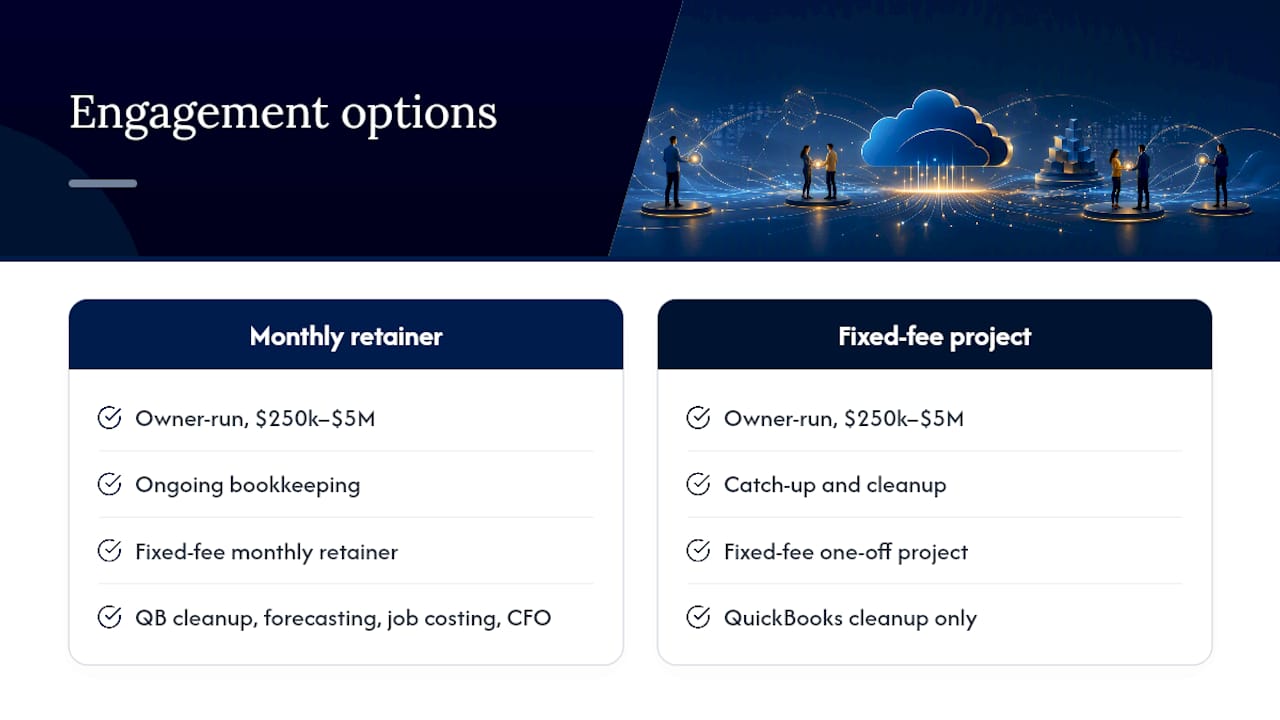
Pricing runs as a monthly retainer for ongoing bookkeeping or a fixed-fee project for catch-up and cleanup work, so you know the cost before anything starts. Onboarding timing depends on the condition of the books, the systems involved, and how much cleanup is required. If you’re ready to stop guessing at your numbers and start seeing them clearly, schedule a bookkeeping assessment and find out what your books are actually telling you.